General Logo Table of Contents MathBits.com Terms of Use TI-84+ Main Page MathBits Home Page TI-Nspire Main Page
Working with Fractions

Things to keep in mind when using your graphing calculator with fractions:

 
Yikes!  There is NO fraction key!!
 
Don't panic! 
If all else fails, just remember that the fraction bar means "divide". 
 

You can always just enter:

35

  as  " 3 divide 5 "      which will first appear as "3 / 5"         
1. Options for Entering Fractions
Let's work with 35 :

1. Type "3" on the screen.

2. Hit ÷ (divide key)

The "3" will now appear as a numerator for a fraction, and the screen is waiting for you to enter the denominator.

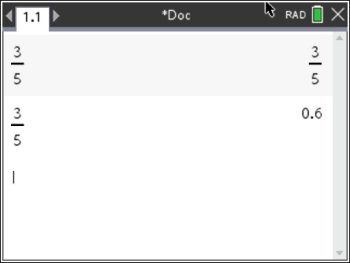
3. After typing "5", hit enter and the calculator will display 35as the result.

4. If you prefer a decimal answer, hit

followed by after the first fraction answer appears.
You can also press ÷ to start, and a template will be given for you to then enter the entire fraction,

If you enter "3 / 5", the fraction 35 will
automatically appear when you hit .

You can also use the fraction template directly from the Template Chart ,
Choose the first (fraction) template.


2. Convert "Fractions to Decimals" and "Decimals to Fractions"
We saw in section 1 that once a fraction is entered, it can be changed to a decimal by simply hitting followed by .

You can also convert a fraction to a decimal by entering the fraction, then choose
#2 Number, #1 Convert to Decimal.

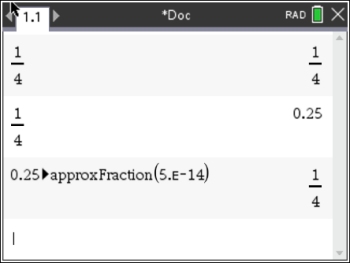
To change a "decimal to a fraction", enter the decimal, then choose #2 Number,
#2 Approximate to Fraction.


3. Arithmetic with Fractions:
Add:

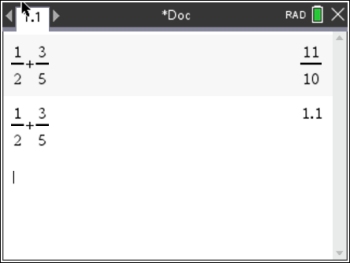
1. Use ÷ to enter the first fraction.
Use the touch pad to move up and down.

2. After entering the denominator, be sure to use the touch pad to arrow right to "leave" the denominator section and return to the normal level.

3. Use ÷ to enter the second fraction.

4. Hit


If you want a decimal answer,
hit .
Multiply:
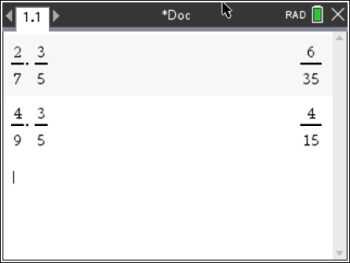
Follow the rules above for entering fractions.

The calculator will multiply the numerators and denominations and state the fraction answer. If the fraction can be reduced, it will be reduced.

Divide:
This division establishes a complex fraction.
(A fraction within a fraction.)

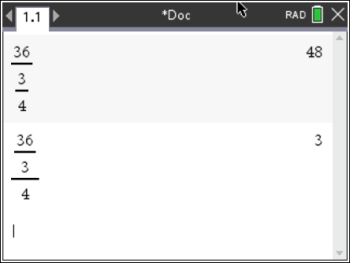
The fastest way to enter this problem is to simply type it directly as 36 ÷ (3 ÷ 4), which will look like 36 / (3 / 4) as you type. Hitting will change to the "complex" look.

Be careful!!! That set of parentheses was needed. Without it (36 ÷ 3 ÷ 4, which will look like 36 / 3 / 4), the calculator will pair the 3 as the denominator of 36 and then divide all of that by 4. Not the same result.


4. Mixed Numbers may be Entered Directly
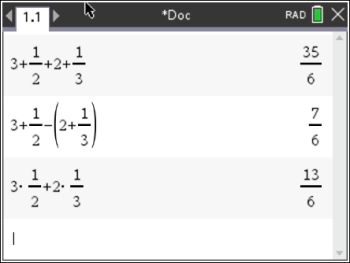
A mixed number 3½ can be entered as it is read ---  " three AND (+) one half "

Add:

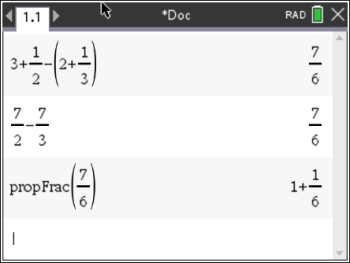
Type (3 + 1/2) + (2 + 1/3)
For addition, the parentheses are not needed.

Subtract:

Type (3 + 1/2) - (2 + 1/3)
For subtraction, the parentheses are needed.
If the parentheses were not used when subtracting, the 2 would have been subtracted, but the 1/3 would have been added.

  Enter as 3 + 1/2


If you try to enter 3½ pushed next to each other, the calculator will interpret it to mean 3 times ½.


5. Mixed Numbers entered as Improper Fractions
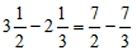
If you have a tendency to "forget" your parentheses when dealing with mixed numbers, you should consider changing all mixed numbers to improper fractions.  This will avoid the need to worry about the parentheses.
Subtract:

Change the mixed numbers to improper fractions before you begin.
Since the improper fraction is one single term, the parentheses for subtracting were not needed.

To change an improper fraction to a mixed number, #2 Number, #7 Fraction Tools, #1 Proper Fraction.


6. Entering Algebraic Fractions
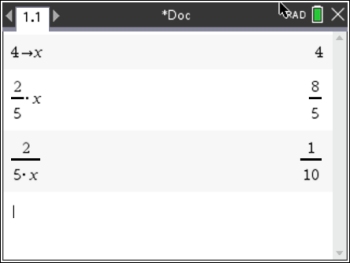
Consider the problem: frac2

For testing purposes, the value 4 was stored in x using the STO►above the key.

Notice the different answers!!!  
The first attempt was entered as 2/5x.
The calculator only recognizes division between the character immediately before and after the division symbol.

The second attempt was entered as 2/(5x),
Parentheses were needed for this problem to give the correct answer of 1/10.


divider
Table of Contents | MathBits.com | Terms of Use